




Gateway: Your Plug & Play Cybersecure Cloud Connection Solution

Connect any camera or IoT brand in bulk quickly and easily. Secure your whole network with end-to-end encryption.
Header imageArrow
Benefits

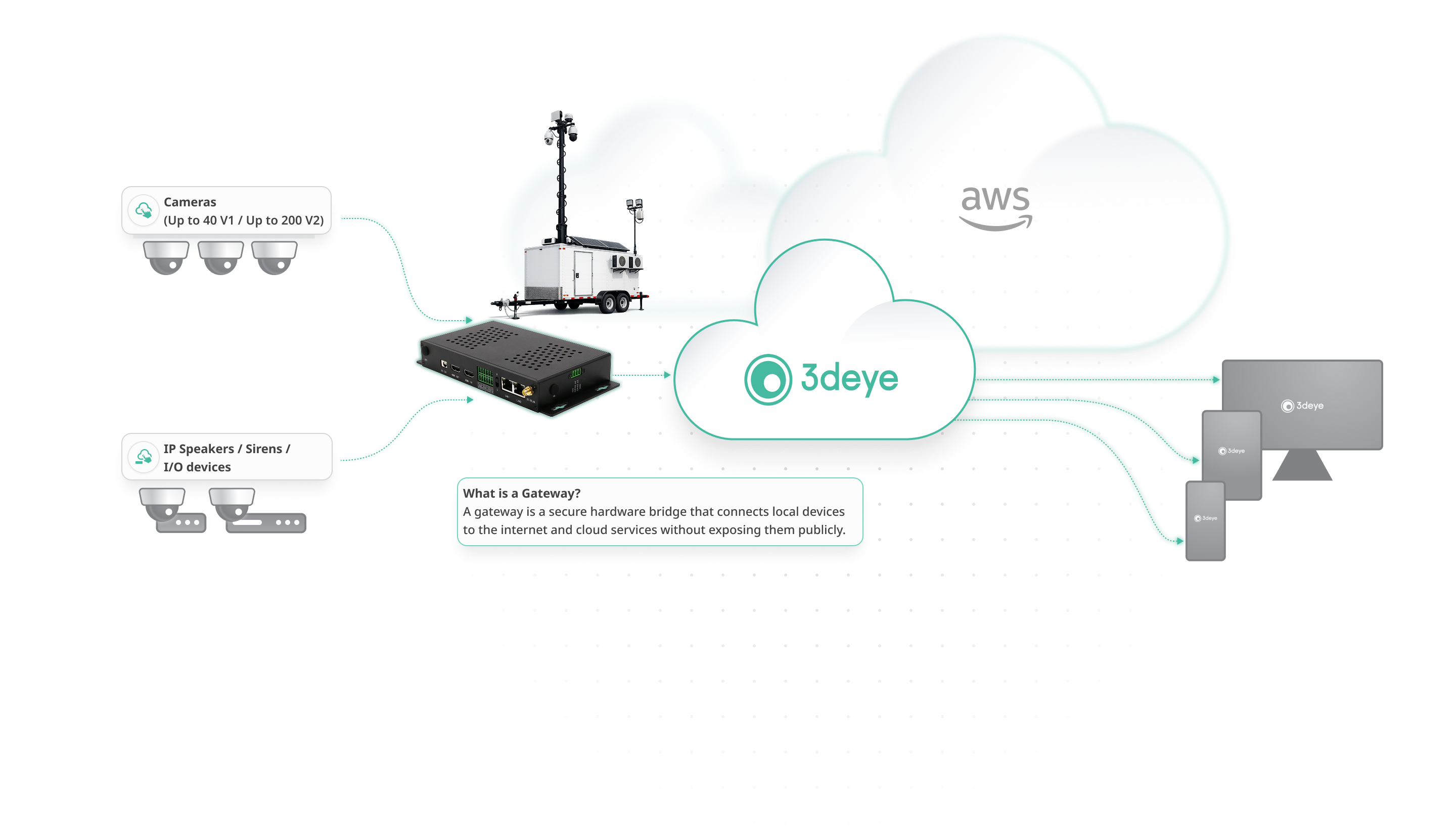
How IP Video Gateways Work

An IP video gateway is the secure bridge between your on-site cameras and the cloud.
Without it, cameras remain isolated inside your local network.
Discovers ONVIF IP cameras and connected sensors
Collects video and event data
Establishes a secure outbound encrypted tunnel
Sends video directly to cloud for storage and AI analytics

3dEYE Gateway to Cloud-enable and Automate any Device or Whole Network

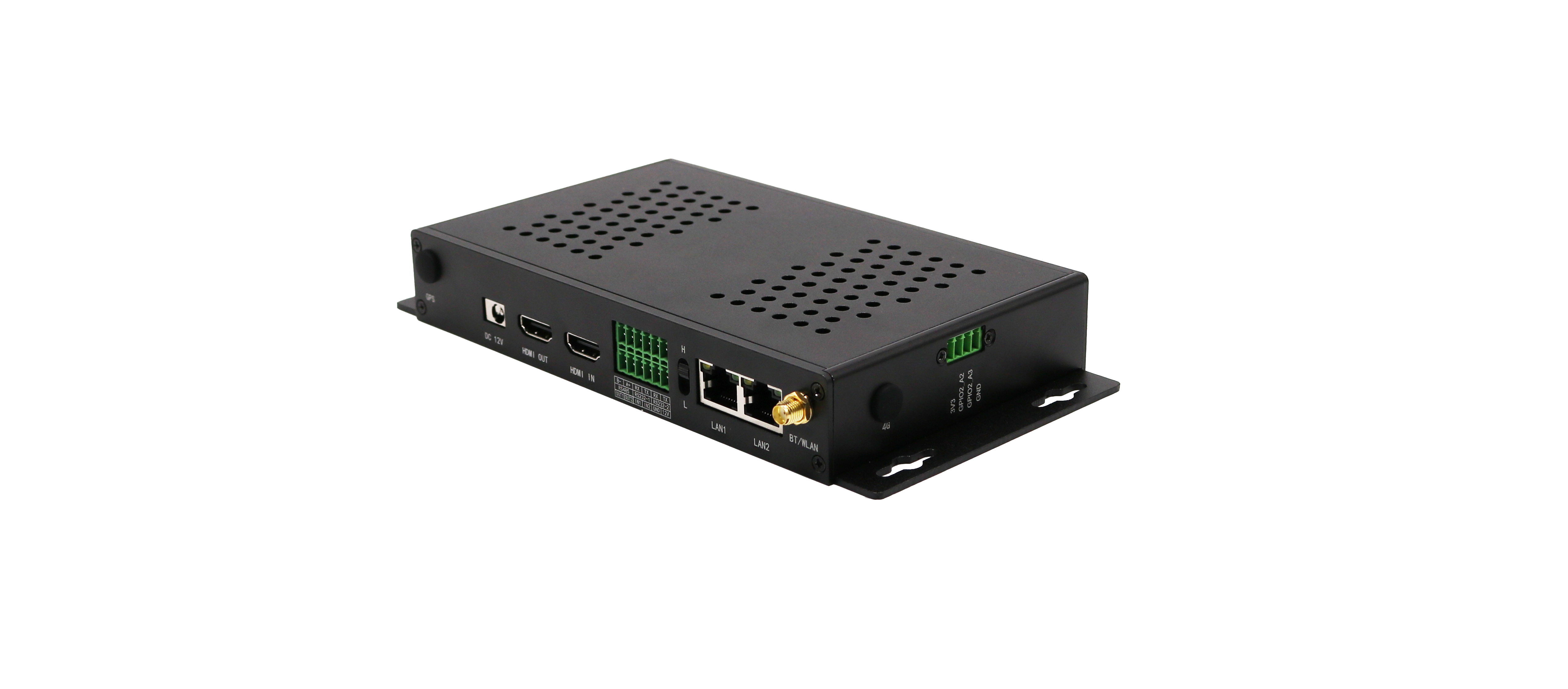
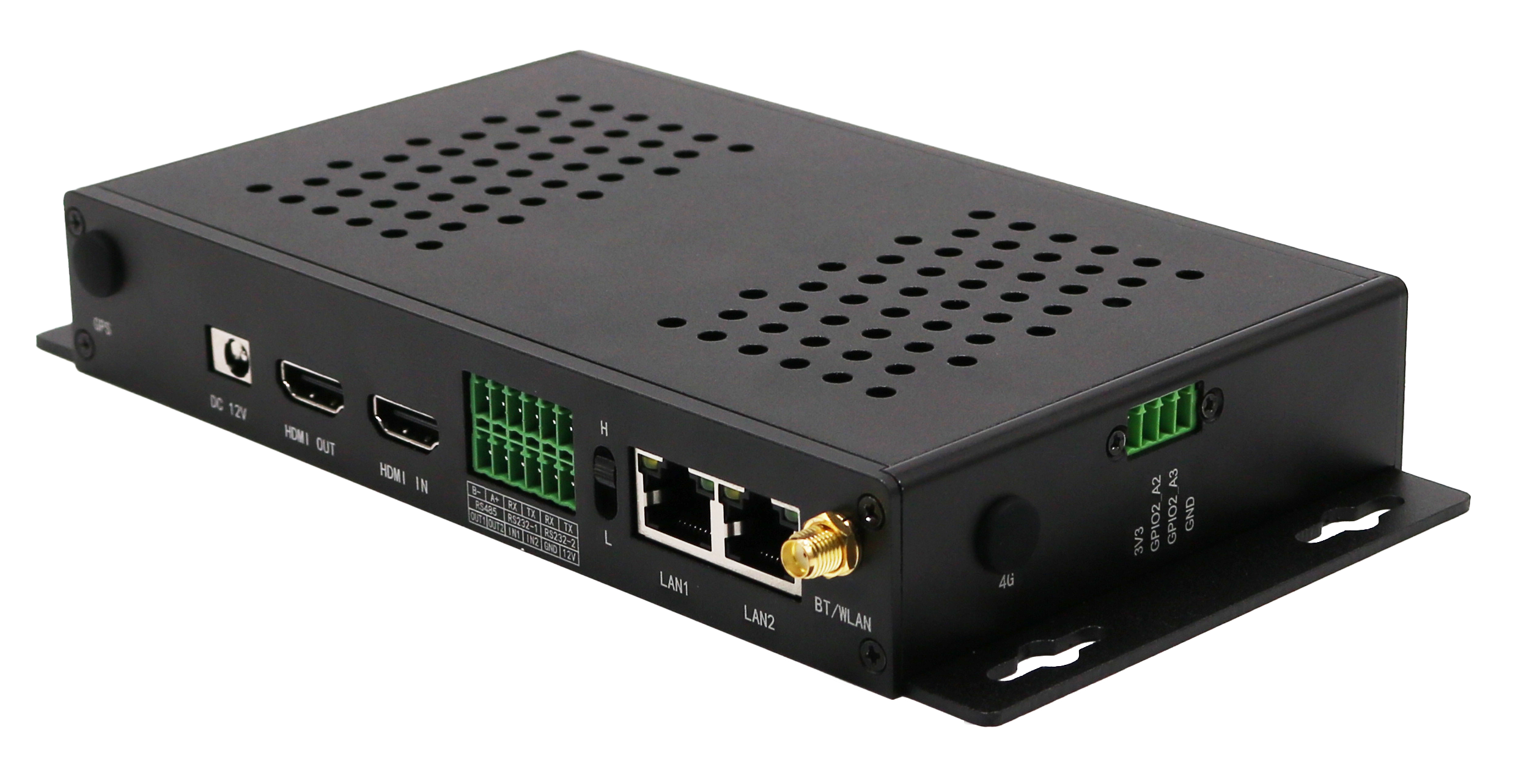
3dEYE Gateway is a versatile and user-friendly compact product designed for partners seeking a plug & play cybersecure connection method to manage multiple camera/IoT devices in bulk. This product is equipped with 3dEYE PUSH technology, making it easy to setup and operate. The 3dEYE Gateway boasts 25 programmable I/O pins and dual audio equipment support, and can accommodate up to 50 devices, contingent upon their form-factor and data stream quality. Its ability to receive webhook triggers via a PUSH connection enables advanced security and automation, without necessitating supplementary smart devices. Whether the goal is to develop a deterrence system utilizing uncomplicated relays and standard lights or sirens, or to procure a dependable and secure mechanism for managing camera/IoT devices, the 3dEYE Gateway is the ideal solution. Furthermore, the 3dEYE Pure Cloud Video and AI Analytics platform provides the convenience of monitoring and controlling devices from anywhere

3dEYE PUSH technology

Equipped with cutting-edge 3dEYE PUSH technology, the Gateway simplifies setup procedures, streamlining your operational tasks. Just add the Gateway to your network and it will auto-discover all cameras and IoT adding them to 3dEYE Pure Cloud Video AI Platform

End-to-End Encryption

Your video and metadata are protected with robust end-to-end encryption, ensuring the highest levels of security and privacy

Programmable I/O Pins and Dual Audio Support

Featuring 25 programmable I/O pins and dual audio equipment support, the 3dEYE Gateway adapts to diverse device requirements

Scalability

Accommodating up to 50 devices*, the Gateway is adaptable to varying form factors and data stream qualities, ensuring seamless integration.

Webhook Trigger Integration

Leveraging webhook triggers through a PUSH connection, this device facilitates advanced security and automation, eliminating the need for additional smart devices.

Automatic Site-to-Cloud Network Connection

Streamlining network connection procedures, the Gateway ensures automatic and secure site-to-cloud connectivity for optimized operations.

OTA Firmware Upgrade

Enjoy the convenience of Over-The-Air firmware upgrades, ensuring your Gateway remains up-to-date with the latest enhancements and security features.

Device Connectivity Options

Easily connect devices via IP, MAC, URL, or benefit from automatic ONVIF device discovery for added convenience.

Camera Status Alerts

Stay informed with comprehensive camera status alerts, ensuring proactive maintenance and issue resolution.

Built-in Web UI Management

Manage your devices effortlessly with the built-in web UI, offering an intuitive and user-friendly management interface.

Webhook API for Automation

Harness the power of the Webhook API to automate processes, integrate with third-party systems, and streamline workflows for enhanced efficiency.
Benefits

Advantages of Pure 3dEYE Gateway

Experience seamless integration with our Pure 3dEYE Gateway, allowing swift connectivity for numerous cameras or IoT devices.

3dEYE PUSH technology

Equipped with cutting-edge 3dEYE PUSH technology, the Gateway simplifies setup procedures, streamlining your operational tasks. Just add the Gateway to your network and it will auto-discover all cameras and IoT adding them to 3dEYE Pure Cloud Video AI Platform

End-to-End Encryption

Your video and metadata are protected with robust end-to-end encryption, ensuring the highest levels of security and privacy

Programmable I/O Pins and Dual Audio Support

Featuring 25 programmable I/O pins and dual audio equipment support, the 3dEYE Gateway adapts to diverse device requirements

Scalability

Accommodating up to 50 or 200 devices*, the Gateway is adaptable to varying form factors and data stream qualities, ensuring seamless integration.

Webhook Trigger Integration

Webhook Trigger Integration: Leveraging webhook triggers through a PUSH connection, this device facilitates advanced security and automation, eliminating the need for additional smart devices.

Automatic Site-to-Cloud Network Connection

Streamlining network connection procedures, the Gateway ensures automatic and secure site-to-cloud connectivity for optimized operations.

OTA Firmware Upgrade

Enjoy the convenience of Over-The-Air firmware upgrades, ensuring your Gateway remains up-to-date with the latest enhancements and security features.

Device Connectivity Options

Easily connect devices via IP, MAC, URL, or benefit from automatic ONVIF device discovery for added convenience.

Camera Status Alerts

Stay informed with comprehensive camera status alerts, ensuring proactive maintenance and issue resolution.

Built-in Web UI Management

Manage your devices effortlessly with the built-in web UI, offering an intuitive and user-friendly management interface.

Webhook API for Automation

Harness the power of the Webhook API to automate processes, integrate with third-party systems, and streamline workflows for enhanced efficiency.

Everything pipes into ONE cloud dashboard

Access intelligence in a singlepain of glass - on battery and energy,  LTE& WiFi Signal​, GPS Location​, larms & Sensors​, Alarms &Sensors​, Historical Data, Configured Alerts​
Comparison

3dEYE Gateway vs Cloud Adapter

Gateway V1 and V2 Specifications
Feature
Overview
Ideal Deployment
Moderate camera counts and standard network / storage requirements
Large‑scale or complex deployments requiring high performance, redundancy, and industrial integration
Camera Capacity*
Up to 40 ONVIF-compliant cameras
Up to 200 cameras*
Form Factor
Compact, low‑power design
Industrial‑grade enclosure for demanding environments
Processor
Quad‑core Cortex‑A72 @ 1.5GHz
Octa-core purposely built for video processing
AI Processing
None
6 TOPS NPU (dedicated Edge AI accelerator)
OS Storage
microSD card
32GB industrial‑grade eMMC
Expanded Storage
USB storage
NVMe SSD storage (PCIe interface, optional/ configurable), USB storage support
Networking
Single Gigabit Ethernet
Dual Gigabit Ethernet with automatic failover forhigh availability and mission-critical deployments
Cellular Connectivity
External USB dongle required
Built-in 4G LTE w/GPS for connectivity resilience
Power
5V USB‑C
12V industrial DC + native PoE support
*Camera capacity depends on resolution, frame rate, bitrate, analytics workload, and network conditions.
Specifications

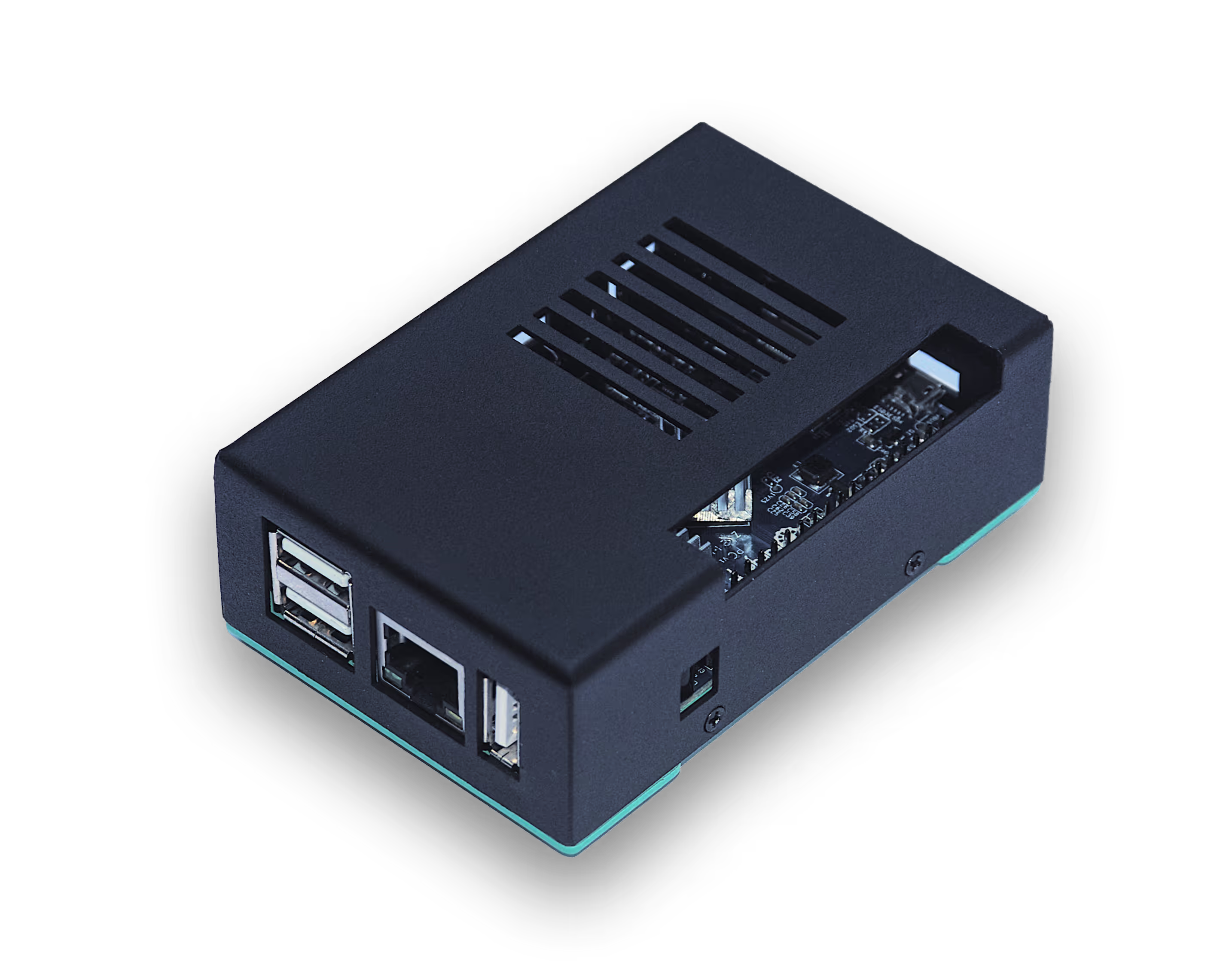
V1 Gateway Specifications:

Dimensions: 95 x 60 x 35 mm
Ethernet Port: (1) 10/100 Ethernet Port
USB Ports: (2) USB 2.0, (1) USB OTG
Video Port: (1) HDMI
Audio Port: 3.5 mm audio output
Enclosure: Industrial-grade metal case
Power Consumption: 2.5 - 4W
Power Supply: AC External
Cooling: Fanless operation
Peripherals: Programmable IO connector
Operating Temperature: -10 to 50°C / -14 to 122°F
Operating Humidity: 5 to 70% Noncondensing
*Gateway Capacity Determination
Please consult support@3deye.ai  to determine the exact gateway capacity suitable for your specific use case.

V2 Gateway Specifications:

CPU: Octa-core: 4x Cortex-A72 @2.2GHz + 4x Cortex-A53@1.8GHz
RAM: 4GB LPDDR5 (32-bit)
GPU: ARM Mali G52 (OpenGL ES 3.2, Vulkan 1.1)
NPU/AI: 6 TOPS INT8 (TensorFlow, PyTorch, ONNX support)
Onboard Storage: 32GB eMMC (faster, more reliable)
Extra Storage: Comes with 1/2/4TB SSD
Expansion: USB, as well as PCIe 3.0 M.2 NVMe
Ethernet: Dual GbE (2x 1000Mbps)
WiFi: 2.4/5GHz WiFi (AP6256)
Bluetooth: 5.1 EDR + BLE
Cellular: Built-in 4G LTE with GPS, nano SIM slot
PoE: Native PoE support
Serial Ports: RS232 + RS485 (native)
GPIO: GPIO with high/low level switching
GPIO: Built-in RTC clock
Power: 12V 2A DC (industrial standard)
Audio: Mic + audio jack
Video Encode: H.265/H.264 4K@60fps, multi-stream
*Gateway Capacity Determination
Please consult support@3deye.ai  to determine the exact gateway capacity suitable for your specific use case.
Reviews

Customers Stories

Since 2014 3dEYE platform has empowered the monitoring and video surveillance industry with the ability to migrate, scale and orchestrate IP cameras and IoT devices on the AWS public cloud. Explore just some of the use cases of our clients.

“Based on the innovation developed by 3dEYE we are very competitive on the Brazilian market of video surveillance. Never have 3dEYE failed us, and they have always been on time, making them a reliable partner to us.”


Rubem Henrique
Rubem Henrique
CEO & Founder at Urbanii, Brazil

“3dEYE offers unprecedented online cloud based video surveillance and management capabilities that we use efficiently in Canada to manage our operations in Israel, USA and the Caribbean.”


Max Kreynin
Max Kreynin
Managing Director at Voxme Inc., Canada

“From our very first meeting, we felt comfortable and confident that not only was the 3dEYE platform superior, but that the delivery, installation, training and after sales service would be top notch.”


Eugene Bodyakin
Cameron Covington
Owner at Siteview Pro, USA

“The power and ease of use of 3dEYE has given us a real competitive advantage in securing key customers in the manufacturing, infrastructure and retail sectors.”

Eugene Bodyakin
Eugene Bodyakin
CEO at Alfatech Surveillance Inc., Canada

“Based on the innovation developed by 3dEYE we are very competitive on the Brazilian market of video surveillance. Never have 3dEYE failed us, and they have always been on time, making them a reliable partner to us.”

Rubem Henrique
Rubem Henrique
CEO & Founder at Urbanii, Brazil

“3dEYE offers unprecedented online cloud based video surveillance and management capabilities that we use efficiently in Canada to manage our operations in Israel, USA and the Caribbean.”

Max Kreynin
Max Kreynin
Managing Director at Voxme Inc., Canada

“From our very first meeting, we felt comfortable and confident that not only was the 3dEYE platform superior, but that the delivery, installation, training and after sales service would be top notch.”

Eugene Bodyakin
Cameron Covington
Owner at Siteview Pro, USA

“The power and ease of use of 3dEYE has given us a real competitive advantage in securing key customers in the manufacturing, infrastructure and retail sectors.”

Eugene Bodyakin
Eugene Bodyakin
CEO at Alfatech Surveillance Inc., Canada
Contact Form

Place Order

Please place your order for 3dEYE Gateways here:
Thank you! Your submission has been received!
Oops! Something went wrong while submitting the form.
Thank you! Your submission has been received!
Oops! Something went wrong while submitting the form.
Contact Form

Place Order

Please place your order for 3dEYE Gateways here:
Thank you! Your submission has been received!
Oops! Something went wrong while submitting the form.
Thank you! Your submission has been received!
Oops! Something went wrong while submitting the form.
Support

Frequently Asked Questions

Everything you need to know about the  3dEYE Gateway product
How does it discover the camera?

It uses the ONVIF protocol to discover cameras. Most ONVIF cameras should be discovered automatically. If the automatic camera discovery fails then there is a manual override to add a camera, though this does require that the technician know the Ip address and the ports of the camera.

Note: In order to add a camera to the Gateway, it is important to ensure that the ONVIF user is enabled on the camera. Without the ONVIF user being enabled, the camera cannot be added. Please make sure that the ONVIF user is enabled on the camera for it to be visible and accessible in the Discovery tab of Gateway.

Do Cameras need to be connected to the cloud as well?

The only requirement is that Gateway and Cameras are connected to the same network. Just basic configurations on the camera have to be completed, things like password, clock, image sensor settings, etc. Also if there is a firewall on the local network ensure that there are no security restrictions that can block the gateway to access the cameras on the local network and that the outbound traffic is allowed through port 443 for the gateway, all outbound and inbound traffic for cameras can be blocked if needed though not required.

What the tech will do?

The tech will connect the gateway to the local network where cameras are and will access the gateway’s web interface. From the web UI it is possible to discover all of the cameras which are on the same network and are ONVIF compliant. Next, the cameras which are to be added to the cloud have to be registered on the gateway using the plus button. Gateway will provide a registration code for each camera to be added through the admin portal to complete the camera integration process.

How long does it take to set up?

Technical setup personnel can be in and out of the installation location within 15-20 minutes if cameras are already installed. The gateway comes with pre-installed software and is ready to start discovering cameras just 2 minutes after it is powered on, all it needs is a stable internet connection and to be connected to the same local network as the cameras. Cameras are discovered automatically and are added to the gateway with a single mouse click. The gateway then will provide you with a unique registration code for every camera that was added. It is even possible to register the gateway in the admin portal as a camera using Gateway’s own registration code and then complete the configure remotely using the “Generate URL” feature from the troubleshooting tab.

How long does it take to set up?

Technical setup personnel can be in and out of the installation location within 15-20 minutes if cameras are already installed. The gateway comes with pre-installed software and is ready to start discovering cameras just 2 minutes after it is powered on, all it needs is a stable internet connection and to be connected to the same local network as the cameras. Cameras are discovered automatically and are added to the gateway with a single mouse click. The gateway then will provide you with a unique registration code for every camera that was added. It is even possible to register the gateway in the admin portal as a camera using Gateway’s own registration code and then complete the configure remotely using the “Generate URL” feature from the troubleshooting tab.

Why the Gateway is needed?

It is the easiest, fastest, most convenient, and safest way to connect any existing camera to the cloud. The Gateway allows a customer to bypass port forwarding to connect their cameras to the cloud through an encrypted secure tunnel ensuring maximum safety of the data and ease of integration. Also, if ISP changes your IP or randomly assigns your IP then, in that case, the Gateway will automatically connect with the Cloud and the User doesn’t have to update the IP on the system every time.


How many devices can be connected to the Gateway?

The number of devices that can be connected at a given time depends on the resolution of the cameras connected and the network throughput. For 720p resolution 30-40 camera streams can be connected at the same time and if cameras are streaming at 4K at 3-4 Mbps then only 8 to 10 camera streams can be connected through a single gateway, and if cameras are streaming at 1 Mbps then 20-25 cameras can be pushed through. Typically the network throughput is the limiting factor in most installations.

What is the size and weight of the Gateway?

V1 It is quite small and about 9.5 cm long, 6 cm wide, and 2.5 cm tall. The Gateway weighs around 100g. Below is a picture of the Gateway, please note that the cover of the Gateway can vary.

Still have questions?
Please access our comprehensive Knowledge Base to obtain detailed information on how to set up, troubleshoot and leverage 3dEYE Gateway product.
Technology Partners