AI Workflows that decide what happens next

3dEYE AI Workflows turn a camera event into a complete response. The AI Operator reviews the clip, your rules decide the path, and speakers, lights or escalation run automatically — across every connected camera and site.
3dEYE AI Workflows builder: an Event Trigger feeds an AI Operator, an If/Else branch and a WASM Transform, then a second AI Operator fans out to Speaker, Light and Escalation actions
1 Trigger
Any event from a connected camera or sensor starts the flow.
2 Assess
The AI Operator reviews the clip against the site's instructions.
3 Decide
If/Else branches with AND/OR conditions choose the path.
4 Respond
Speaker, light and escalation actions run in parallel.
Why AI Workflows

Automate the monitoring operation, not just the detection

Detection tells you something moved. AI Workflows decide whether it matters, what to do about it, and when a person needs to see it.

Judgement on every event

The AI Operator assesses each alert in context — what it sees, the site's own instructions, and the time of day — before anything reaches your team.

One rule, every site

Build an AI Workflow once and assign it to cameras, zones and schedules at any location. It runs in the cloud, on any camera brand you have connected.

People on the decisions that count

Routine alerts are handled automatically. Operators receive the events that need judgement — with the clip, the AI's reasoning and the next steps attached.
How it works

From camera event to verified response

A typical after-hours deterrence rule in AI Workflows. Each step maps to a block in the builder, and each one can be changed per site.
  1. 01 · Event Trigger

    Detect

    A person enters a restricted zone outside working hours. Cloud or camera-side analytics raise the event.
  2. 02 · AI Operator

    Assess

    The AI Operator reviews the clip, rates the risk and recommends an action based on the site's instructions.
  3. 03 · Speaker · Light

    Deter

    A pre-recorded message plays through the on-site IP speaker, and lights switch on at the same time.
  4. 04 · If/Else · Escalation

    Escalate

    If the person is still there after 30 seconds, an operator gets a prioritised alert with the clip and dispatches guards.
Inside the NextGen Monitoring Portal

When an AI Workflow escalates, the operator sees the reasoning

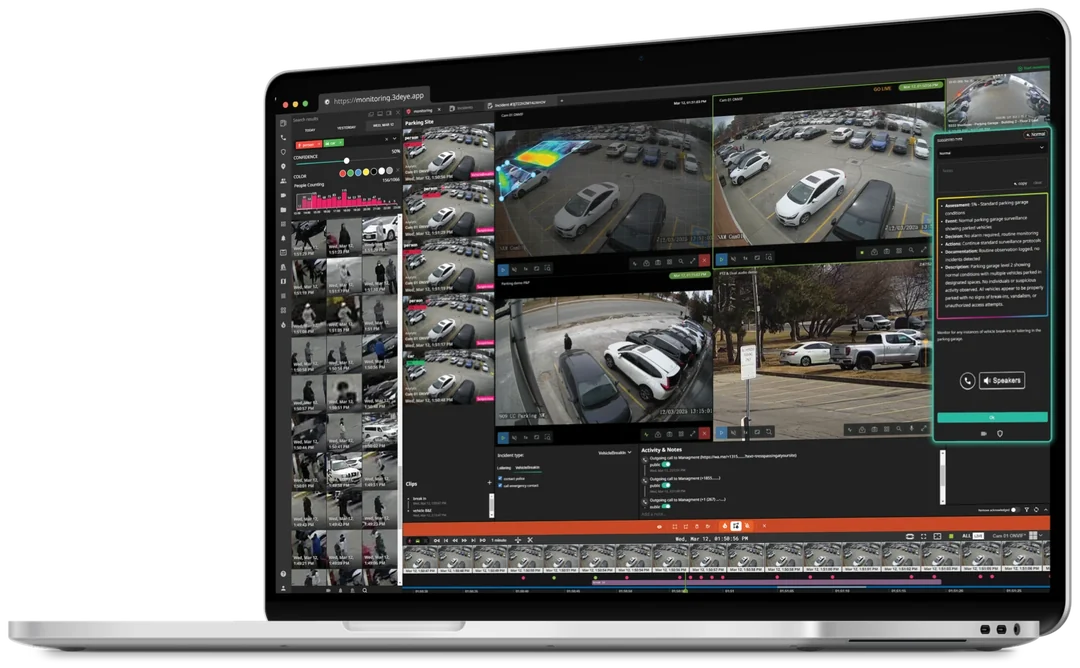
Escalated events open in the NextGen incident view with live and recorded video, the site's instructions and the AI Operator's assessment side by side.
  • AssessmentA risk level and a plain-language description of what the AI observed.
  • DecisionThe recommended course, based on the site's own procedures.
  • ActionsTalk down over the site speakers or call a contact in one click.
NextGen Monitoring Portal incident view on a laptop: parking-garage camera feeds, event thumbnails, the timeline and the AI Operator's assessment panel with call and speaker actions
Human in the loop

Automated where it's routine. Human where it matters.

You decide exactly where automation stops. Every AI Workflow draws the same line between what runs by itself and what waits for a person.

What AI Workflows automate

Reviewing each event and filtering routine activity
Rating risk and describing what happened
Playing talk-down audio and switching lights or relays
Waiting, re-checking and branching on the result
Logging every action against the event and its clip

What your team controls

Which cameras, zones and schedules each AI Workflow covers
Detection masks, object classes and the confidence threshold
Site instructions, contacts and escalation paths
Which actions run automatically and which need approval
Every dispatch to guards or law enforcement
When is human review required?
Whenever an AI Workflow reaches an escalation step — and always before dispatch. The AI Operator recommends; a human operator confirms. Ambiguous events can be routed straight to a person instead of an automated response.
Use cases

AI Workflows for real monitoring work

Each AI Workflow stacks a detection, a condition and a response. Start from a template and adjust it to the site.

Perimeter and restricted areas

Stop intrusions before they become incidents, with talk-down first and an operator second.
When
Person in zone after hours
Then
Speaker + light, escalate if they stay
People detection

Parking lot security

Catch loitering and break-in behaviour around vehicles without watching every feed.
When
Loitering near parked vehicles
Then
Talk-down, then operator review
Loitering detection

Safety and PPE compliance

Flag missing hard hats or safety vests in work zones and keep a record for compliance.
When
No hard hat or vest in a work zone
Then
Notify the supervisor, log the event
PPE detection

Gate and access control

Let known plates and faces through automatically, so operators handle only the exceptions.
When
Plate or face at the gate
Then
Known: log it. Unknown: operator
ALPR

Incident investigation

Keep the evidence together from the moment an event fires, ready for insurers and legal teams.
When
An event is escalated on any site
Then
Clips, notes and actions go into the incident report
Video Portal search

Retail theft and ORC

Recognise repeat offenders the moment they enter any connected location.
When
Watchlist face or plate match
Then
Alert store staff and the operator
Face recognition
Cameras and integrations

Works with the cameras, devices and platforms you already run

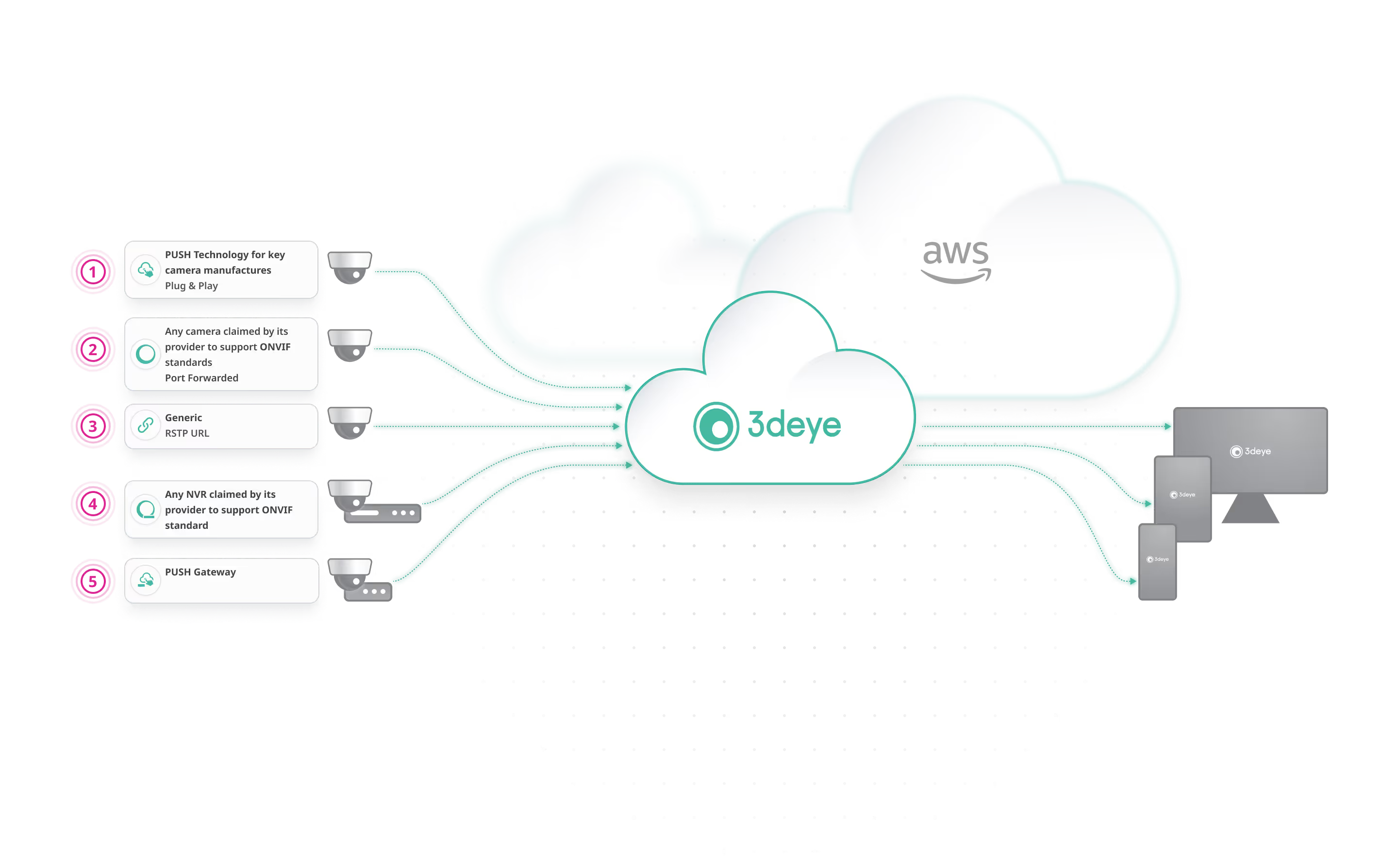
AI Workflows sit on top of pure cloud video management, so there is nothing to install on site beyond your cameras — and a Gateway where you want edge processing.
How cameras connect to the 3dEYE cloud on AWS: PUSH plug-and-play cameras, ONVIF cameras, generic RTSP streams, ONVIF NVRs and the PUSH Gateway, delivered to desktop, tablet and phone
Cameras
Multi-brand IP cameras over ONVIF or RTSP, plug-and-play Hanwha, Milesight, Sunell, Uniview, i-PRO and Intelbras models, and IONODES body-worn cameras. Plug and play
On-site devices
IP speakers for talk-down; lights and relays through Gateway V2 I/O pins and Modbus TCP. Gateway
Monitoring platforms
Immix, Evalink, Bold Group, ESI, Patriot and vidsys. Technology partners
Custom logic
Webhooks and IFTTT, WASM Transform blocks in the builder, and the full API and SDK. API and SDK
Built to scale

Cover more sites without adding headcount

When routine events resolve themselves, each operator can take on more cameras — and give full attention to the alerts that are left.
Up to 4×
more cameras for a single live monitoring operator with the AI Operator, without sacrificing performance
Platform update, March 2026
6 s
event delivery to the 3dEYE monitoring portal with low-latency analytics
Platform update, June–August 2024
  • Fewer false alarms reach operators
  • Faster, consistent response on every site
  • Evidence and audit trail for every event
  • No on-site servers or NVRs to maintain
Support

Frequently Asked Questions

Everything you need to know about 3dEYE AI Workflows
3dEYE AI Workflows are rules that connect a camera event to an automated response. Each one chains a trigger, an assessment by the AI Operator, conditions and actions — such as a speaker announcement, a light or an escalation to an operator — so routine events are handled without anyone watching the feed.
Any event a connected camera or sensor raises: a person or vehicle detection, a line crossing, restricted-area entry, loitering, a licence plate, a face match, fire or smoke, missing PPE, or a temperature event.
The AI Operator is the agentic assistant in the NextGen Monitoring Portal. In an AI Workflow it reviews the event clip in context, rates the risk, describes what it observed and recommends an action based on the site's instructions. Its output can drive the next step or be shown to an operator.
Whenever the AI Workflow escalates, and always before a dispatch to guards or law enforcement. You can also send ambiguous events straight to an operator instead of an automated response.
Yes. AI Workflows can play pre-recorded audio through IP speakers and switch lights or relays through the Gateway, in parallel or in sequence.
Yes. AI Workflows run in the cloud and apply to any connected camera, zone or schedule, regardless of brand or location. Change the rule once and it updates everywhere it is assigned.
AI Workflows respond to individual events as they happen, and the AI Operator assists your operators with each alert. AI Vision Agent is a separate product: it looks across your video continuously, scoring risk per site with severity levels and trends, and delivers prioritised recommendations in scheduled reports.
Events can route to the NextGen Monitoring Portal or to integrated platforms such as Immix and Evalink, with the video attached. Custom integrations are available through webhooks and the API.
Still have questions?
Please access our comprehensive Knowledge Base to obtain detailed information on how to set up, troubleshoot and leverage AI Workflows.
Technology Partners

See AI Workflows on your own cameras

Book a walkthrough with our team, or connect a camera and build your first AI Workflow on a free trial.